
Visual desktop automation for Windows
Automate repetitive work.
Without writing code.
TessNode turns everyday clicks, keystrokes, decisions, and desktop tasks into visual automations you can build, edit, and run whenever you need them.
TessNode for BusinessRuns locallyVisual automationNo subscription requiredWindows 10 / 11
One run instead of another routine
Stop doing the same work twice.
Every time
01Open application
02Wait
03Click menu
04Copy information
05Open another app
06Paste information
07Save
08Repeat
With TessNode
Run Workflow
One visual flow. Ready to use again.A workflow you can see
Build automation visually.
Connect nodes
Add conditions and logic
Run your automation
Real product. Visible logic.
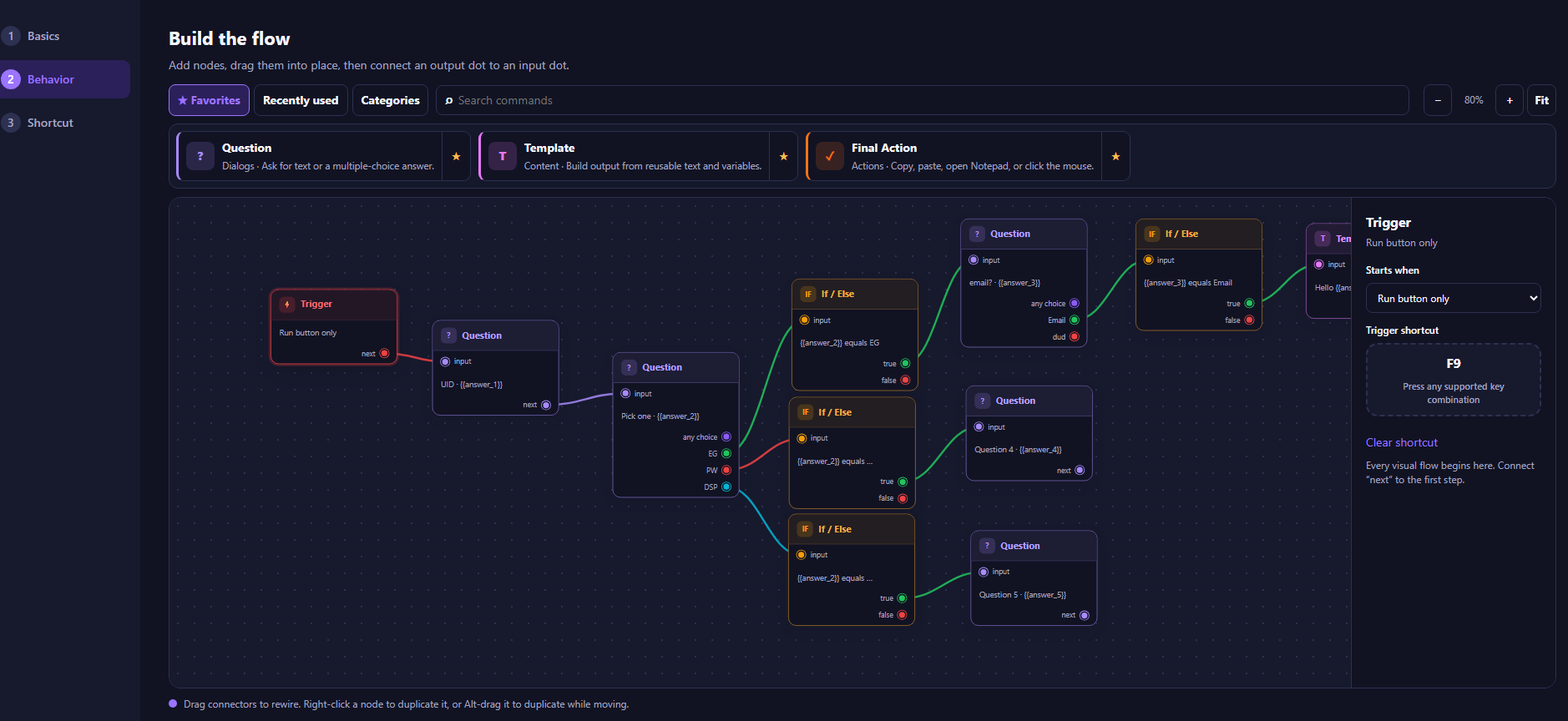
See exactly what your automation will do.
Triggers, questions, conditions, reusable templates, shortcuts, and connected workflow paths stay visible on one canvas.
TriggerQuestionIf / ElseTemplatesShortcutVisual paths
Capabilities
Everything you need to automate repetitive desktop work.
shipping
Visual workflow builder
Connect actions and decisions on a clear canvas.
shipping
Mouse and keyboard actions
Turn routine clicks and keystrokes into reusable steps.
shipping
Triggers
Start from the Run button or a supported shortcut.
shipping
Conditions and branching
Route a workflow based on answers and app state.
shipping
Hotkeys
Launch frequently used workflows from the keyboard.
shipping
Open applications and URLs
Bring the right Windows tools into each flow.
beta
Wait conditions
Pause until the next step is ready to run.
beta
Reusable templates
Build outputs from reusable text and variables.
beta
Debug / step-through mode
Inspect a workflow one step at a time.
beta
Workflow import/export
Move workflows between supported installations.
beta
Loops
Repeat a defined group of actions with an exit path.
planned
Image detection
Respond when a visual target appears on screen.
planned
Pixel/color detection
Use on-screen color state as a workflow signal.
planned
Scheduler
Run supported workflows at configured times.
shipping
Local workflow storage
Keep workflow definitions on your computer.
Planned features are roadmap items and are not presented as currently available.
Local-first by design
Your workflows stay on your computer.
TessNode is designed as a local-first Windows application. Your workflow logic does not need to be uploaded to a cloud service just to run.
- Local execution
- No cloud account required
- No workflow upload required
- No advertising
- Core automation works offline
Specific security behavior will be documented as technical testing is completed.
Use cases
Automate the work hiding in your workday.
Office & AdministrationOperationsE-commerceAccounting & BookkeepingLogisticsProperty ManagementIT & SupportCreatorsSmall Business
repetitive data entrydaily report downloadsfile moving and renamingcopying data between applicationslaunching daily workspacesrecurring browser workflowsscheduled desktop routines
For individuals
Your time is worth more than repetitive clicks.
TessNode Personal
$29.99 one-time
- One user
- Personal use
- No subscription
- Full TessNode application
- Use on up to 2 personal PCs
For teams
TessNode for Business
Give teams a visual way to automate repetitive Windows workflows without requiring every employee to become a programmer.
- Commercial licensing
- Volume licensing
- Local execution
- Centralized purchasing
- Deployment support
- Purchase orders accepted
- Invoice billing available
- Security documentation
- Evaluation licenses
Ready when you are